Showing posts with label GUI. Show all posts

Thursday, February 24, 2011

Functor Pattern: Separating Layout from Behaviour in SilverLight Control Design

SilverLight controls may get complicated when it has to handle mouse events and keyboard events. When too many events need to be handled the size of the code behind may grow to a big size. In this post, I'll show a design structure that separates the event handling logic from the layout of the Control. The purpose is to avoid code behind file growing into unmanagable size.

This simple example assumes you need a control to handle the following requirements:
1. There is a part in the control where user's left click must turn the control into "selected" mode
2. There is a part in the control where user's left click must invoke a sorting operation according to the sorting parameter bound to the control
3. When user right click on any part of the control, a context menu should be shown

The "normal" way of handling mouse events is to either override the mouse event functions in the UserControl class, or add mouse handler functions in the control. Putting user gesture event handling code in the code behind file is the main force that drives its size to grow. To avoid this problem, we'll use a set of mouse handler classes to handle these events instead.


Here is the layout of the control.


Other classes.


Here is the start up wiring.


Here is how we handle the first requirement.


Now sorting.


This is how context menu is created.
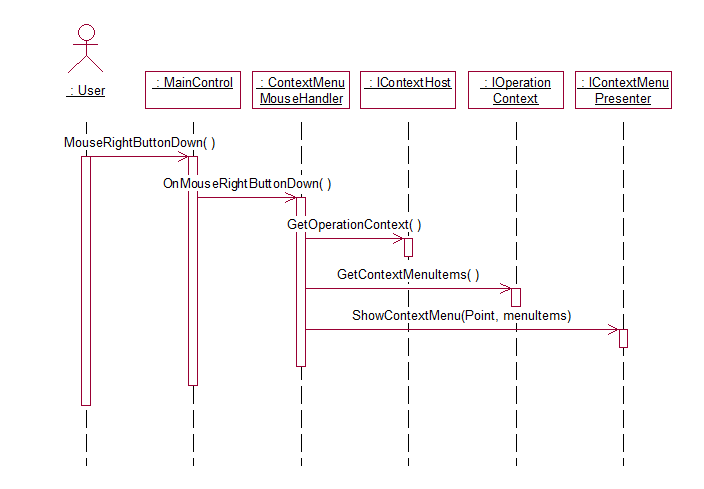

As shown above, the main control doesn't have any mouse event handling logic but some supporting functions. There is no if-else logic to resolve where the mouse left click is and what it means, sorting or selecting. There is no reason for the size of the code behind file to grow out of control when more complicated mouse handling is required. Each mouse handler class does one thing and one thing only.

Further more, the main control class has a much better chance to be reused since different usages may choose what mouse handlers to attach or not attach to give it different behaviour, e.g. not allow sorting. People may also override MouseHandler functions in derived MouseHandlers to provide different behaviour while no change is needed to the main control class. By attaching and detaching MouseHandlers at runtime, the main controls behaviour can also be changed at runtime.

The same approach can be applied to keyboard handling as well.

In C# implementation you don't really need the MouseHost class. Just add and extension to the UserControl class.

public static class MouseExtension
{
public static AttachMouseHandler(this UserControl userControl, IMouseHandler mouseHandler)
{
userControl.MouseEnter += mouseHandler.OnMouseEnter;
...
}
public static DetachMouseHandler(this UserControl userControl, IMouseHandler mouseHandler)
{
userControl.MouseEnter -= mouseHandler.OnMouseEnter;
...
}

}

Sunday, October 3, 2010

Replace MVVM with AbstractView pattern

With MVVM pattern, sometimes, people run into the problem that the VM class soon explodes to the size of a few thousand lines of code. To solve this problem, I'll present a new pattern I call Abstract View.

The reason for VM class to explode in size is that it is carrying too much responsibility.
1. Provide binding properties
2. Provide binding commands
3. Provide implementaion for commands and other functions required by the View and its code behind.

For a complicated view, it won't take long for the view model class to reach unmanagable size. To solve this problem we need to delegate some of the functions to other classes. But the View class still requires a binding target. Instead of using a View Model class, I'll call this simplified view model class Abstract View in that it defines the possible properties and operations a concrete view that is bound to it may carry out hence define the view in an abstract manner.

Here is a static view of this new pattern.


By using more than one CommandProviders, you can separate concerns horizontally and by allowing CommandProviders to user other delegates, you can separate concerns vertically. Mediators become facades for various delegated function units each providing service of a subject area.

This is a sequence diagram for starting up.


A typical user edit action sequence.


A typical user command handling.


Close view.


In this pattern, most of the functionality is moved out of the "ViewModel" class therefore it's size will be under control. When the Mediator size is grown out of control, it may optionlly use other delegates to redistribute its functionality.

Wednesday, July 14, 2010

Understand Model-View-Controller (MVC)

Among all the design patterns, MVC is probably the most cited. It had become such a legendary that part of it has been mystified. Wiki page for it even claims it "is a software architecture, currently considered an architectural pattern".

The following are some excerpts from the earliest description of MVC.

"In the MVC paradigm the user input, the modeling of the external world, and the visual feedback to the user are explicitly separated and handled by three types of object, each specialized for its task. The view manages the graphical and/or textual output to the portion of the bitmapped display that is allocated to its application. The controller interprets the mouse and keyboard inputs from the user, commanding the model and/or the view to change as appropriate. Finally, the model manages the behavior and data of the application domain, responds to requests for information about its state (usually from the view), and responds to instructions to change state (usually from the controller). " [SB]

"Unlike the model, which may be loosely connected to multiple MVC triads, Each view is associated with a unique controller and vice versa. Instance variables in each maintain this tight coupling. " [SB]

"Models are those components of the system application that actually do the work (simulation of the application domain). They are kept quite distinct from views, which display aspects of the models. Controllers are used to send messages to the model, and provide the interface between the model with its associated views and the interactive user interface devices (e.g., keyboard, mouse). Each view may be thought of as being closely associated with a controller, each having exactly one model, but a model may have many view/controller pairs." [KP]

"To maximize data encapsulation and thus code reusability, views and controllers need to know about their model explicitly, but models should not know about their views and controllers." [KP]

"Every instance of a view has exactly one model and exactly one controller. The model is normally set explicitly. Because view and controller classes are often designed in consort, a view's controller is often simply initialized to an instance of the corresponding controller class." [KP]

If we put all these together, the following class diagram is a good description of this pattern in its static view.


The following sequence diagrams show this pattern in action.
Initialization:


User Interaction Handling example:


Release:


The main benefit of this pattern is "This three-way division of an application entails separating (1) the parts that represent the model of the underlying application domain from (2) the way the model is presented to the user and from (3) the way the user interacts with it." [KP]

This pattern was designed in the environment of SmallTalk-80. Clearly, it had achieved what it is intended for.

However, when apply it to different development environment, adaption is often necessary. The biggest difference in most popular development environments versus SmallTalk is probably the fact that most of the them have GUI support frameworks, MFC/C#/VB/Java on Windows platform and Java/Cocoa on Mac. Most of these GUI support frameworks provides a set of "Controls" with built-in keyboard and/or mouse handling capability. It seems the "Controller" is now mostly merged into "Views" in these frameworks. The spirit of MVC is the separation of concerns. Despite the changes in development environment, the need for separation of concerns has never been altered. "Controller" in the form of its classic definition may not be required anymore but there is still the need for a class to control the transition of user device (keyborad and mouse) control, to interpret user guestures into business actions, to control model persistence. In this sense, MVC is still a valuable pattern for any GUI design project.

[SB] Steve Burbeck, "How to use Model-View-Controller (MVC)", 1987

[KP] Glenn E. Krasner and Stephen T. Pope "A Description of the Model-View-Controller User Interface Paradigm", 1988